All guides
15 min read·Intermediate·7 steps·3 screenshotsDeliverability

Deliverability in practice: staying out of spam

Deliverability is not one setting but the interplay of four things: the domain's technical setup, mailbox reputation, volume and content. When one limps, all of them suffer.

Deliverability is the topic most people tackle when the open rate has dropped to 8% and nobody knows why. This guide is the order to tackle it before that: domain, DNS, warm-up, volume, content, signals.

Every step has a screen in Colldly that tells you whether it is done. None of it is one-off: deliverability is monitored continuously, not set once.

1

Separate your outreach domain

Never send campaigns from the domain you use to communicate with clients. Buy a similar domain and use it only for outreach. If its reputation suffers, your main mail stays untouched.

2

Set up all three DNS records

SPF says who may send on behalf of your domain. DKIM signs messages so their authenticity can be verified. DMARC decides what to do with a message that fails the checks. Without DMARC the big providers gradually penalise you.
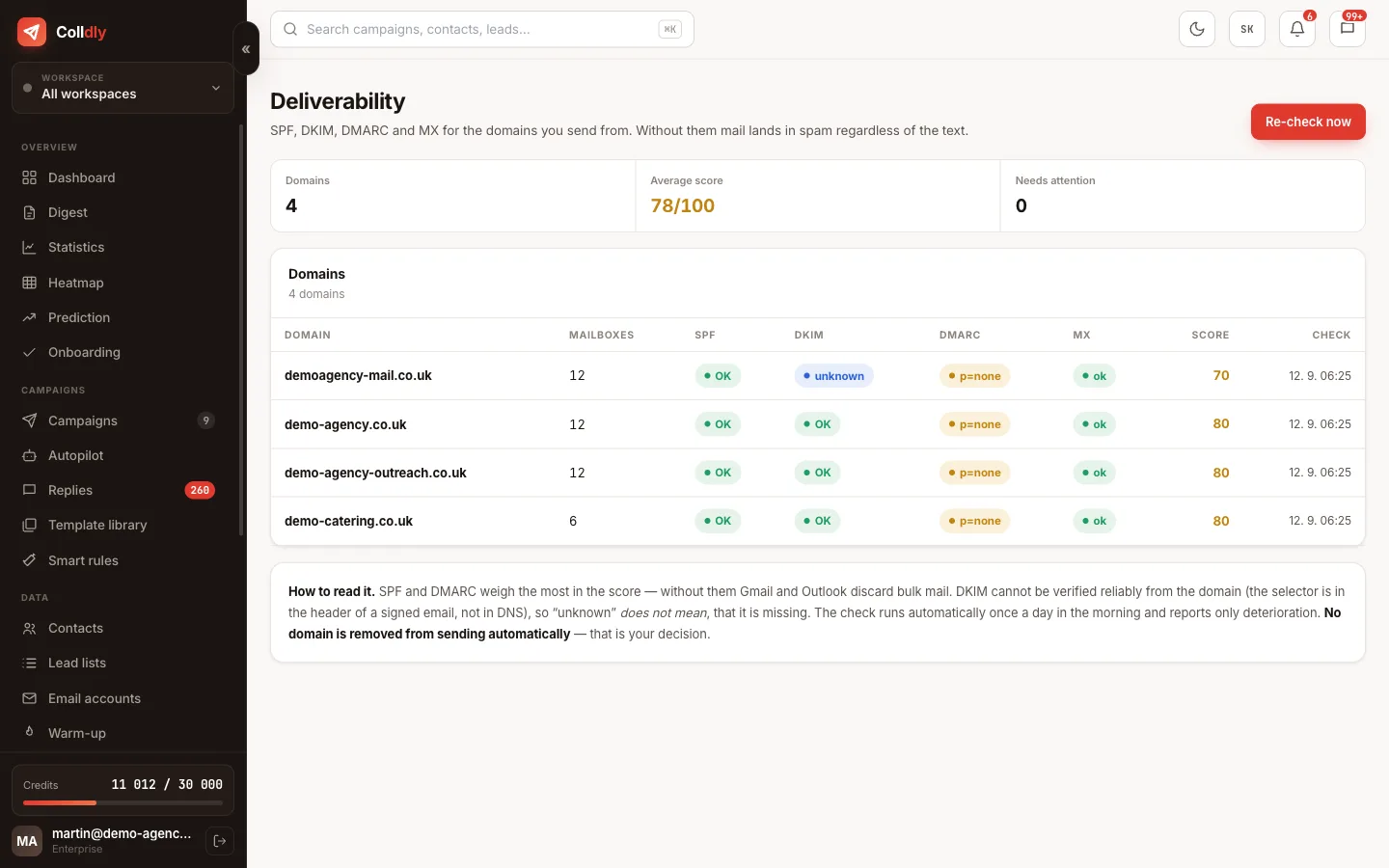
Tip: In Deliverability you find the exact values and a check whether they have propagated.
colldly.com/dashboard › Deliverability
SPF, DKIM and DMARC check in Colldly with exact values to copy
3

Warm up for two to four weeks

A new mailbox needs a history of ordinary communication. Warm-up sends small volumes, receives replies and gradually raises the cap. It pulls messages out of spam into the inbox itself, repairing reputation.
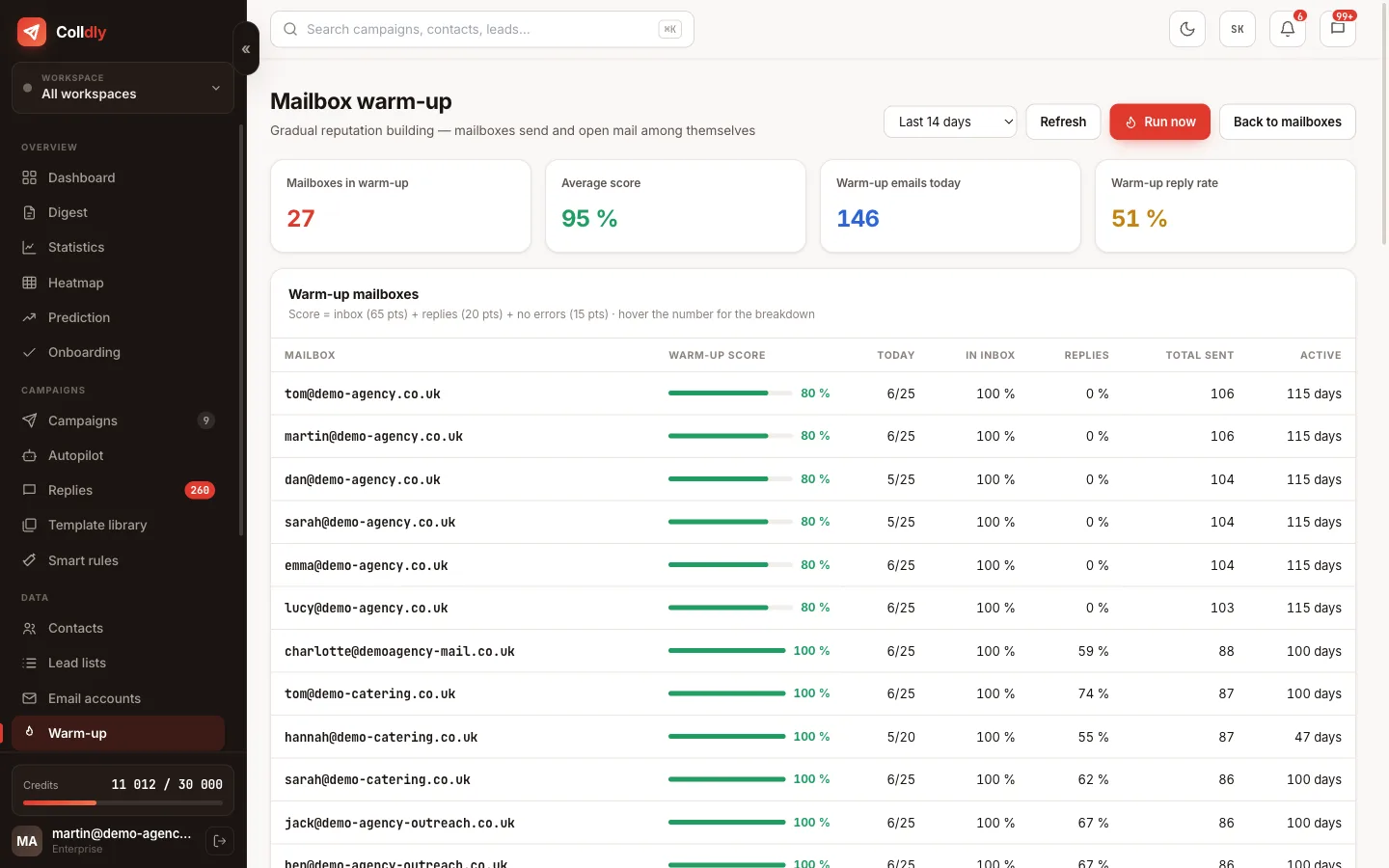
colldly.com/dashboard › Warm-up
Mailbox warm-up in Colldly: score, daily volume and growth
4

Keep a safe daily volume

For a warmed-up mailbox count on up to 50 cold emails a day. Want more? Add mailboxes, not volume on one. Ten mailboxes at 40 emails each are safer than two at 200.
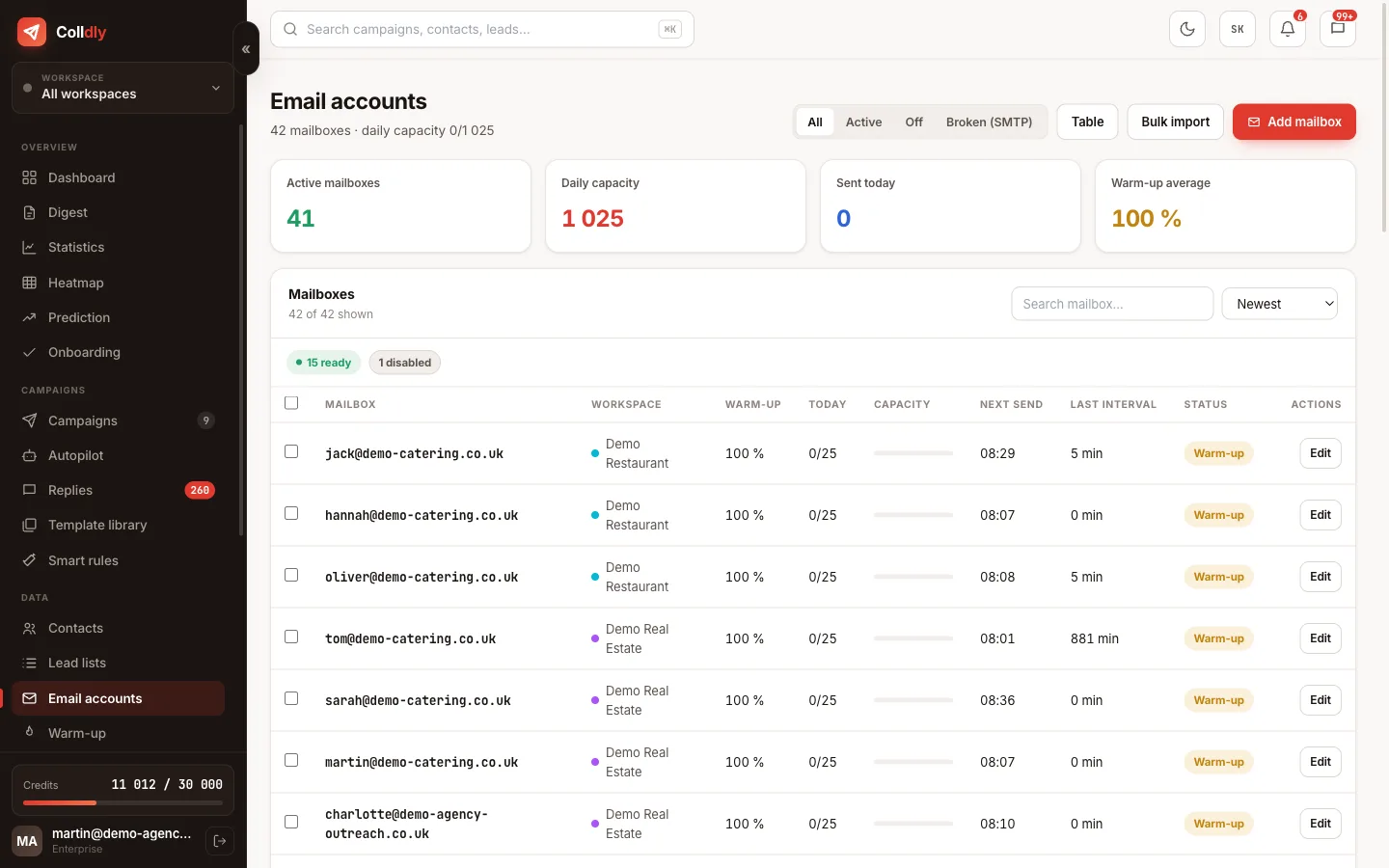
colldly.com/dashboard › Email accounts
Email accounts in Colldly with daily capacity and gaps
5

Clean the list before sending

Keep the bounce rate under 3%. Address verification runs automatically, but consider dropping risky and catch-all addresses if your bounces grow. One badly cleaned batch can ruin weeks of warm-up.

6

Watch the signals and react

When bounces rise or the open rate drops, stop and look for the cause before sending another thousand. The system sends you an alert, but the decision is yours.

Tip: A sharp drop in open rate with unchanged copy is usually the first sign that messages started landing in spam.
7

Write so the filters let you through

No attachments, minimal links, no image footers, no words like "free" in the subject. Plain text from a human always passes better than a graphically polished email.

What to avoid
Jumping from zero to 100 emails a day. A sudden increase is a clear signal to the filters.
Sending to an old purchased list. A high bounce rate destroys reputation in a single day.
Turning warm-up off after launching campaigns. Reputation has to be maintained, not just built.
Checklist
  • Cold emails go out from a secondary domain, not your main one
  • SPF, DKIM and DMARC passed the check under Deliverability
  • A new mailbox warmed up for 14 to 28 days
  • Daily limit per mailbox is under 50, gaps are random
  • Bounce rate is under 3%, hard bounces are removed
  • Emails are plain text, no images, at most one link and only in a follow-up
  • You have a custom tracking domain
Questions about this guide
How do I know I am landing in spam?
Open rate under 15% on a verified list, zero replies after 200 emails, or warm-up messages the system has to rescue from spam. Colldly shows the domain score and warns about rising bounces.
What if reputation has already dropped?
Stop campaigns from the affected mailbox, leave it in warm-up only for 2 to 3 weeks, fix the cause (list, content, volume) and ramp up slowly. If the domain is burnt, buying a new one is cheaper.
Do I need a custom tracking domain?
Not mandatory, but recommended: a shared tracking domain carries every user's reputation. One CNAME record and links go through your domain.
Continue with
Next guide in order: How to choose a target group that replies
Start today

Colldly does all of this for you

It finds the companies, writes personalised emails, guards deliverability and puts the replies into one inbox. Start for free, no card.

Start for free
No credit card · First 200 credits free · Cancel anytime