All guides
30 min read·Beginner·7 steps·6 screenshotsGetting started

Your first campaign in 30 minutes

From an empty account to the first sent email. Add two to four weeks for mailbox warm-up; that runs in the background while you prepare the rest.

This guide is for someone with an empty account who wants to send the first emails today. We walk the whole road: connecting a mailbox, checking the domain, warm-up, the offer profile, a list of companies, the sequence and launch. Every step shows the screen you will see in the app.

The one thing that cannot be done in 30 minutes is warming up a new mailbox. That needs two to four weeks. So connect it first and prepare everything else in the meantime. If you already have a warmed-up mailbox, the first emails leave today.

1

Connect a sending mailbox

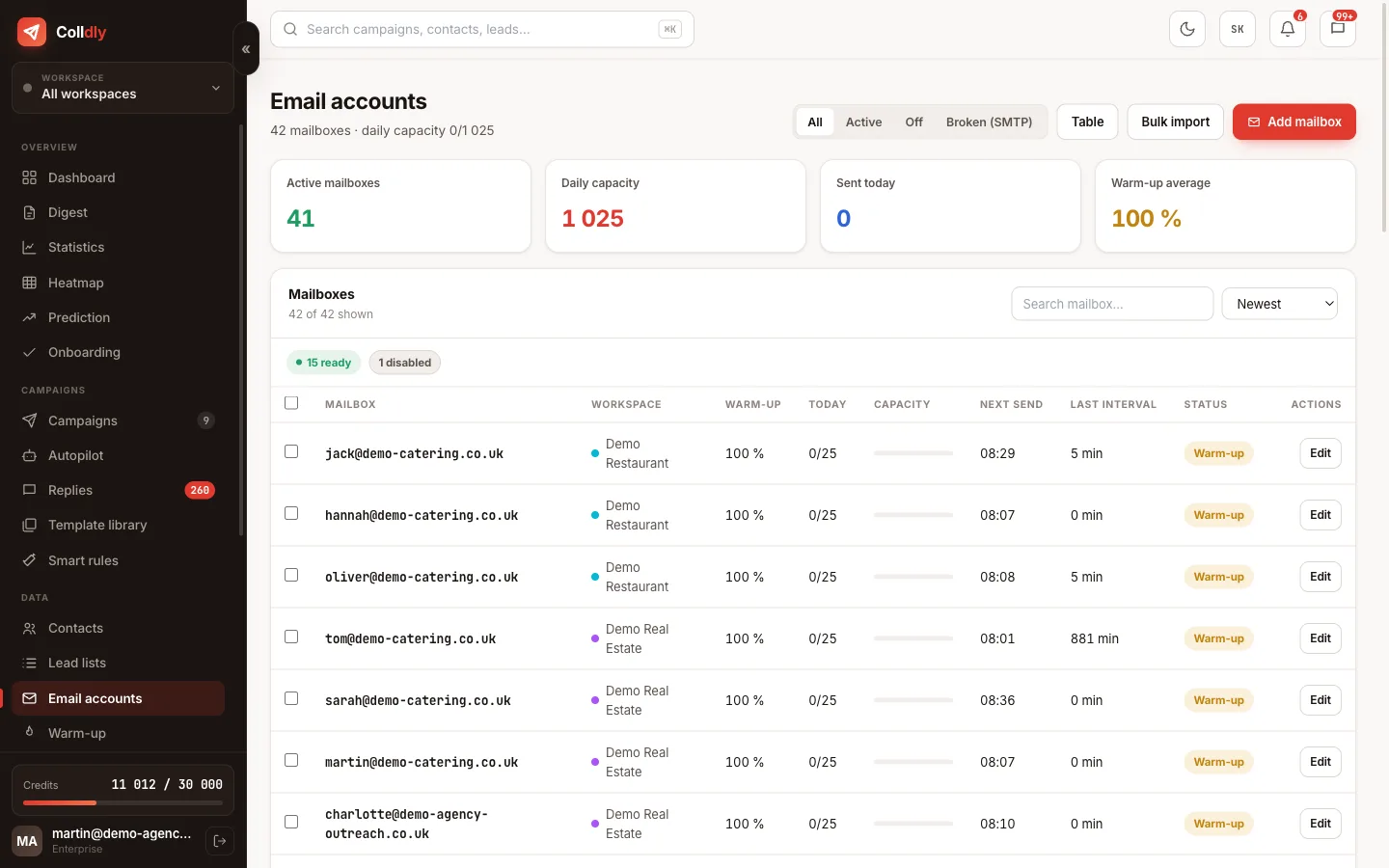
In Email accounts add a mailbox via SMTP and IMAP. Do not use your main company domain: buy a similar domain just for outreach so that a possible reputation problem never touches your everyday mail.
Tip: Ideally 2 to 3 mailboxes on 2 domains. Rotation then spreads the volume and no address gets overloaded.
colldly.com/dashboard › Email accounts
Email accounts in Colldly: connected mailboxes with capacity, warm-up and SMTP status
2

Check SPF, DKIM and DMARC

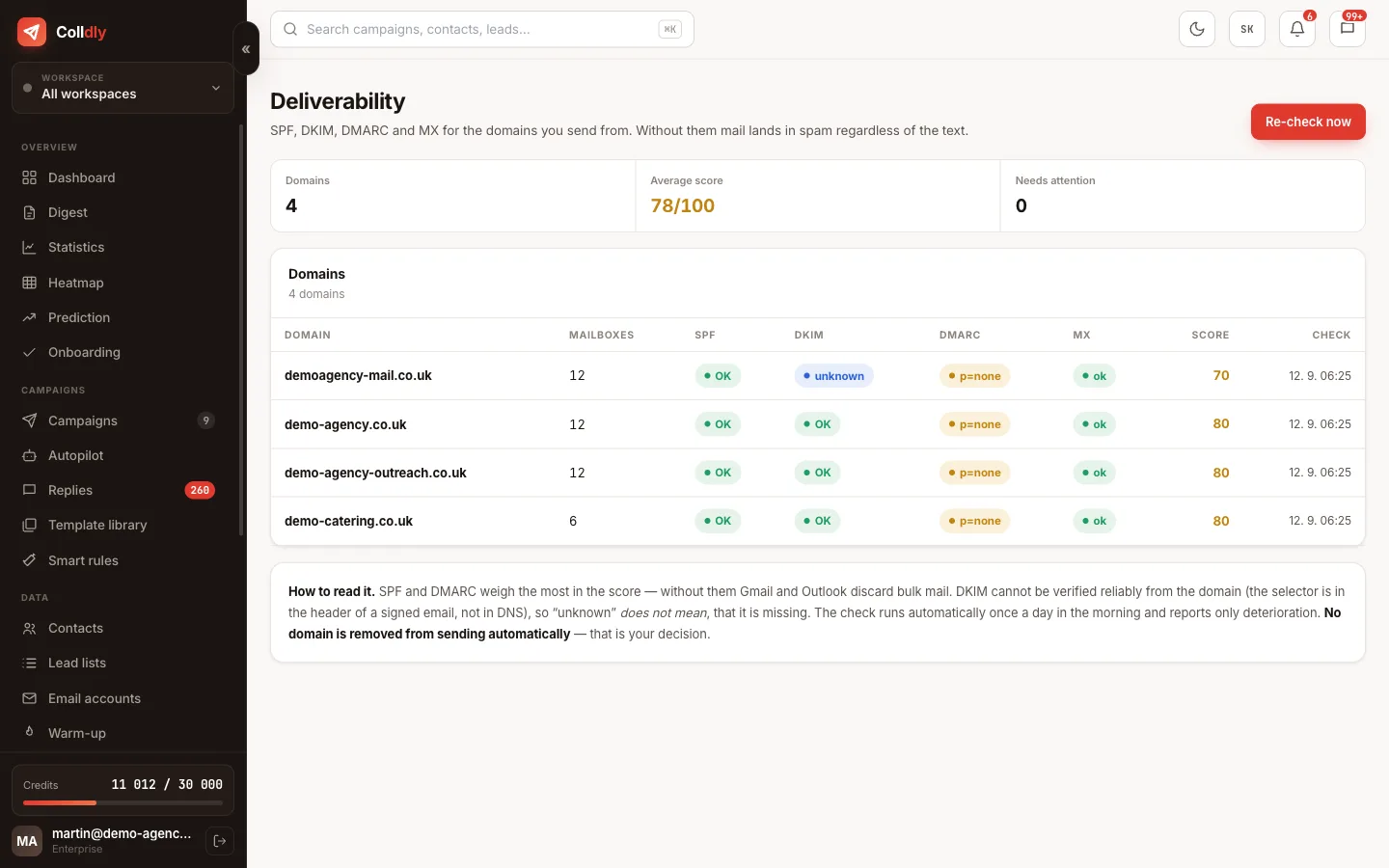
In Deliverability run the domain check. The app shows you which records are missing and the exact values to copy to your domain provider. Without these three records a large share of emails goes straight to spam.
Tip: A DNS change takes effect within a few hours. Run the check again the next day.
colldly.com/dashboard › Deliverability
Deliverability in Colldly: SPF, DKIM, DMARC check and domain score
3

Turn on warm-up

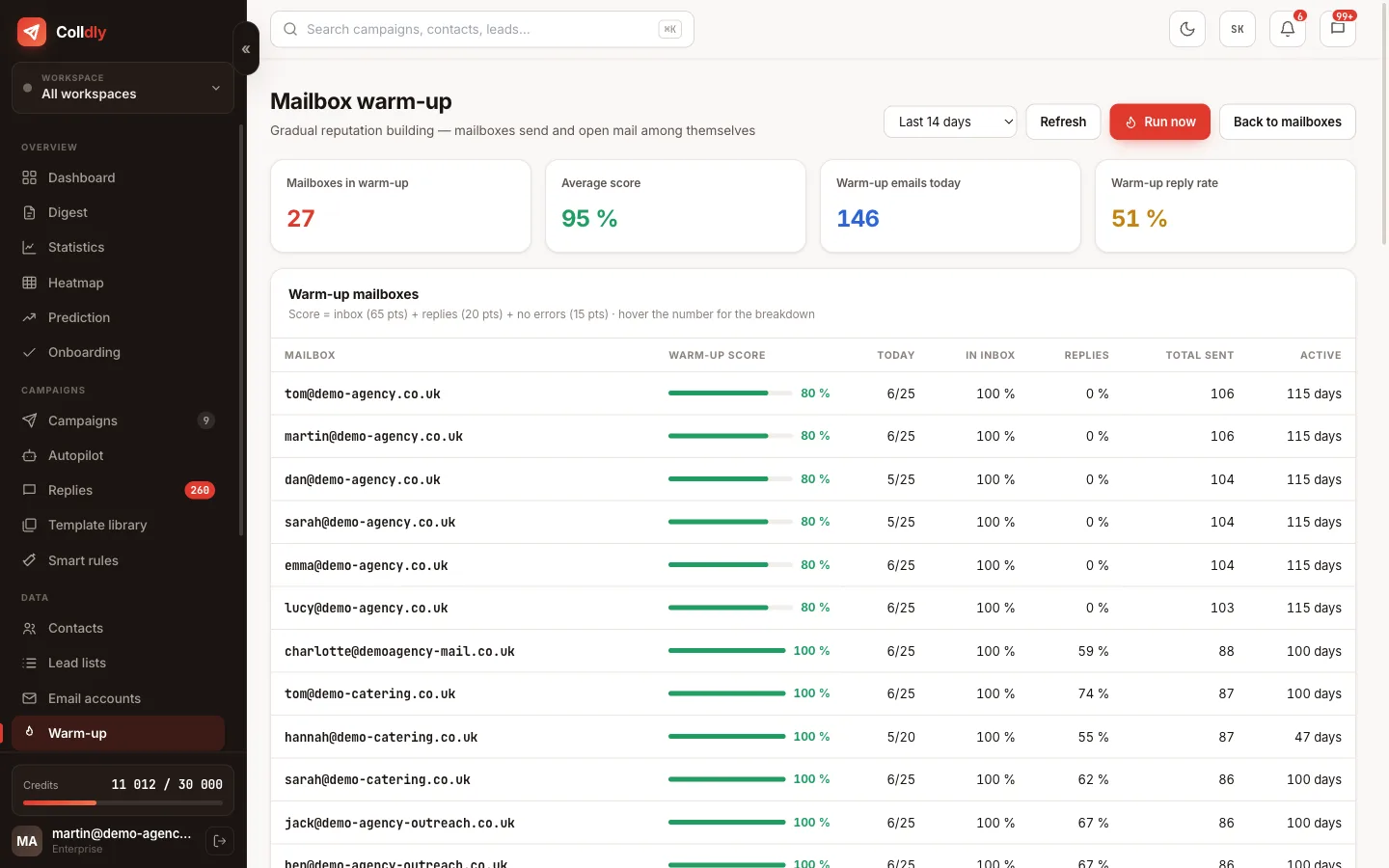
For every new mailbox switch on warm-up and set the target daily volume. The mailboxes start writing to each other and building reputation. This is the only step that cannot be rushed.
Tip: While the mailbox warms up, carry on with the next steps. You launch the campaign when it is ready.
colldly.com/dashboard › Warm-up
Mailbox warm-up in Colldly with daily volume and score
4

Fill in your offer profile

Describe what you sell, who it helps and what makes you different. The AI uses this in every campaign, so it is worth ten minutes. Be specific: not "we do marketing" but "we build websites for tradespeople that bring enquiries from Google".
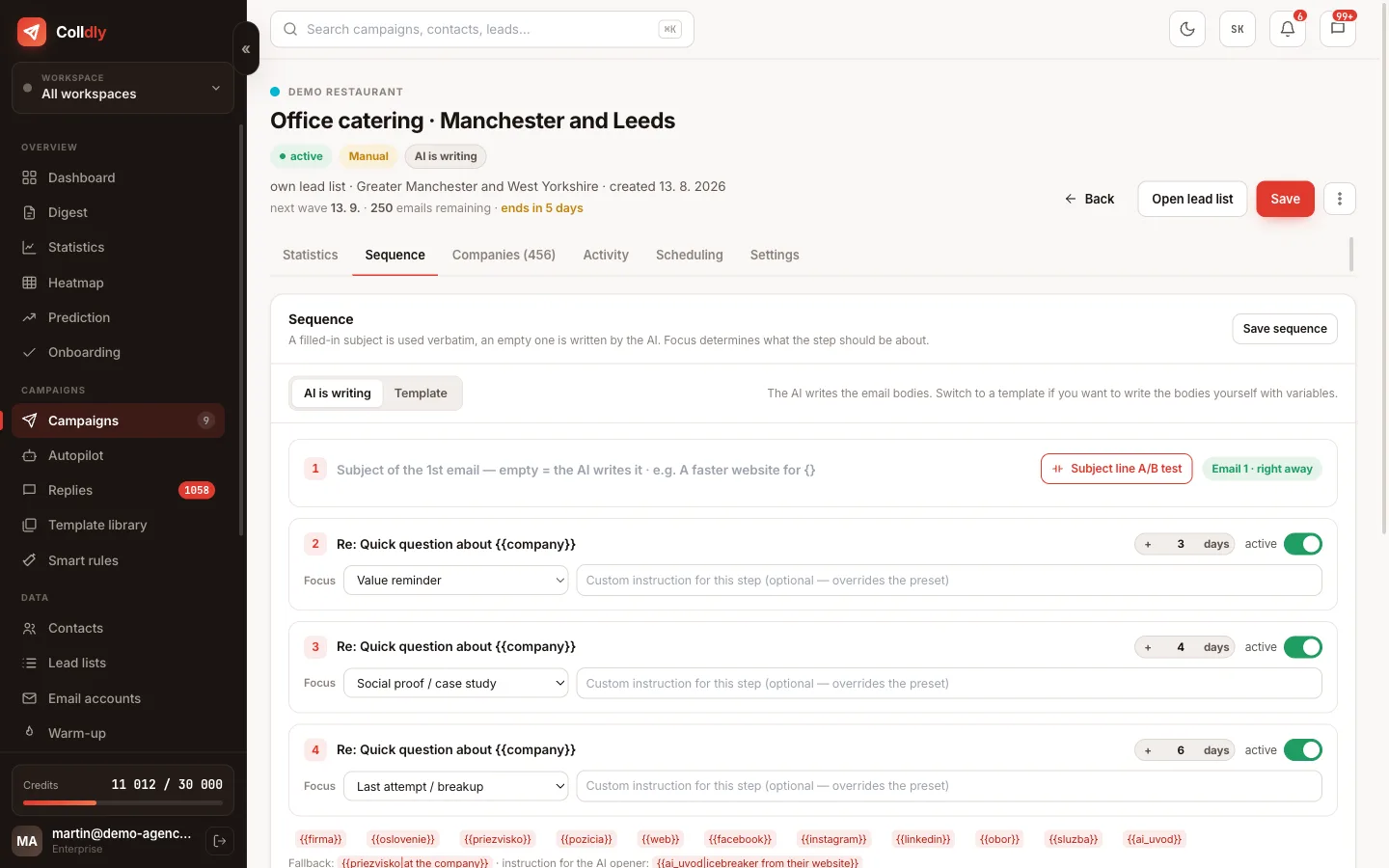
colldly.com/dashboard › Campaigns
Campaign detail in Colldly: sequence, steps and follow-up focus
5

Build a list of companies

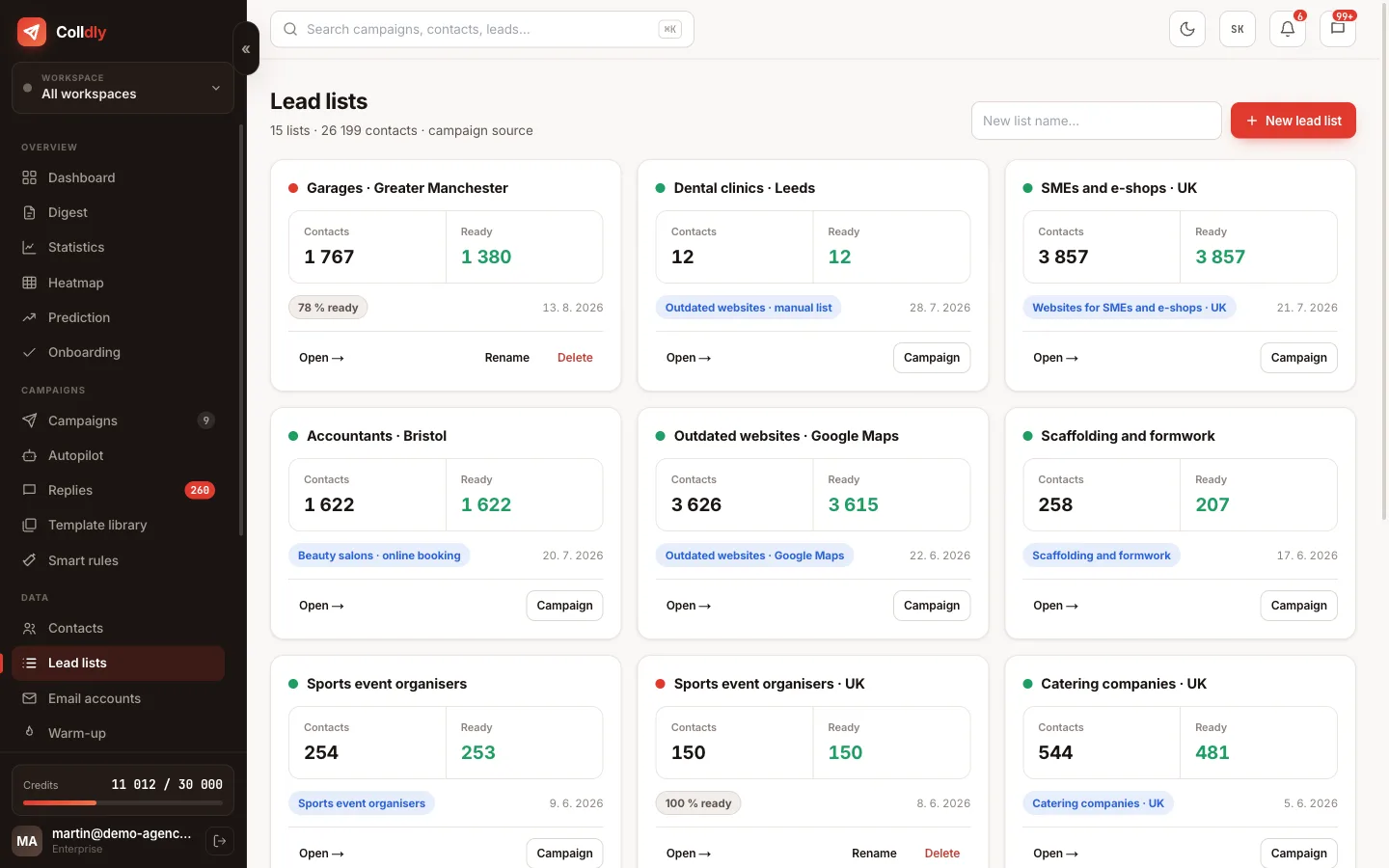
In Lead lists enter an industry and a region. The system finds companies, looks up contacts and verifies emails. Start with a smaller list, say 100 to 200 companies from one industry; it is easier to judge whether the message fits.
Tip: One industry per campaign. Different industries need different copy and mixed numbers tell you nothing.
colldly.com/dashboard › Lead lists
Lead lists in Colldly with company counts and ready contacts
6

Create the campaign and sequence

Pick the lead list, set the tone and language and add two to three follow-ups spaced 3, 7 and 14 days apart. The AI generates the copy and you review the previews on a few specific companies.

Tip: Always look at the preview. A typo in a template or an unfortunate phrase is easy to miss in the editor, not on a real contact.
7

Set the schedule and launch

Choose weekdays, a time window such as 9:00 to 16:00 and the time zone. Launch the campaign and the system sends at a human rhythm with gaps. The first replies usually arrive within 48 hours.
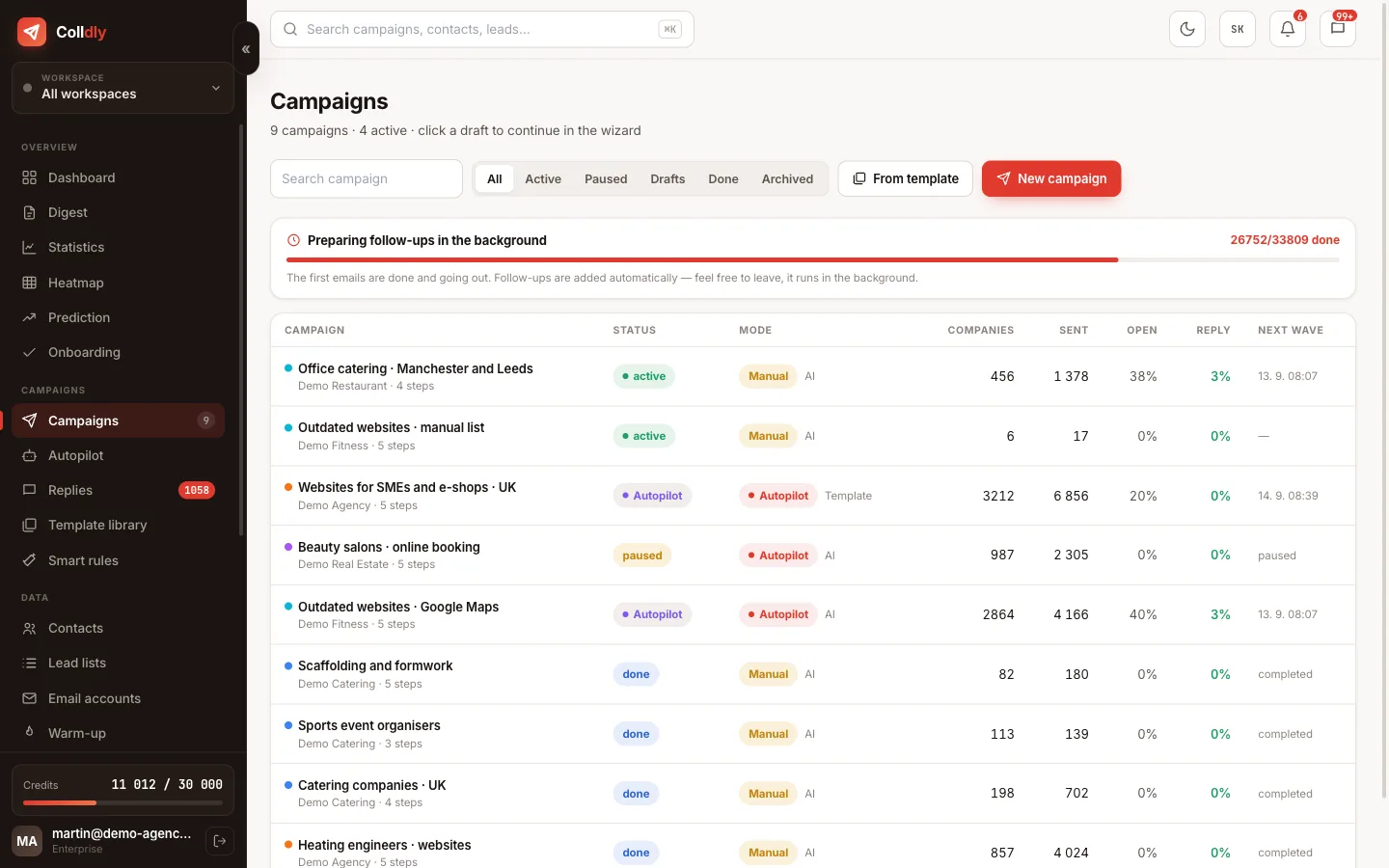
colldly.com/dashboard › Campaigns
Campaign overview in Colldly with status, mode and next wave
What to avoid
Launching a campaign from a mailbox that is not warmed up. It ends up in spam and damages the domain for weeks ahead.
Sending from your main company domain. A reputation problem would hit your everyday mail too.
Sending 500 emails at once on day one. A sudden jump in volume is a classic spam signal.
Checklist
  • A mailbox on a secondary domain is connected and the SMTP and IMAP tests passed
  • SPF, DKIM and DMARC are green under Deliverability
  • Warm-up is running (at least 14 days before the first campaign)
  • The offer profile has all 5 fields filled in specifically, not generically
  • The lead list has 100 to 200 companies from one industry and area
  • The sequence has 3 to 5 steps spaced 3, 7 and 14 days
  • You previewed the email on two real companies
  • The sending window is working days, 8:00 to 16:00, in the recipient's time zone
Questions about this guide
Do I have to wait for warm-up if my mailbox is old?
If the mailbox has been sending and receiving normal mail for years it has a reputation and a slow ramp-up is enough: 10 emails a day the first week, then increase. A brand-new mailbox with no history should always be warmed up.
How many credits does a first campaign use?
For 150 companies with a 3-step sequence roughly 150 (finding) + 150 (enrichment) + 150 (verification) + 450 (emails) = 900 credits. The Free plan with 200 credits covers a trial campaign of 25 to 40 companies.
When will I see the first replies?
Opens within 24 to 48 hours, the first replies usually within 3 to 7 days once the follow-ups kick in. Watch them in Unibox with the "Interested" filter.
Continue with
Next guide in order: How to write a cold email that gets a reply
Start today

Colldly does all of this for you

It finds the companies, writes personalised emails, guards deliverability and puts the replies into one inbox. Start for free, no card.

Start for free
No credit card · First 200 credits free · Cancel anytime